Mariana Sá
Selected work

Concept project · Product Design

NutriFast

Making healthy eating easier to sustain.

Bridging the gap between nutritional guidance and everyday life through personalized meal preparation.

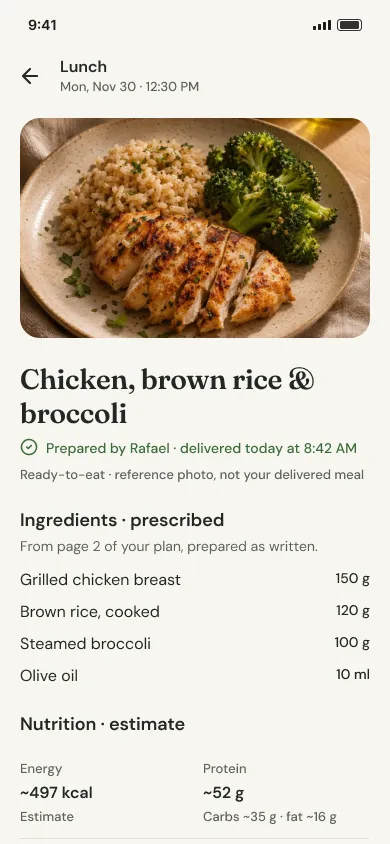
Meal details: chicken, brown rice and broccoli, prepared by Rafael, with prescribed ingredients and quantities from page 2 of the plan.
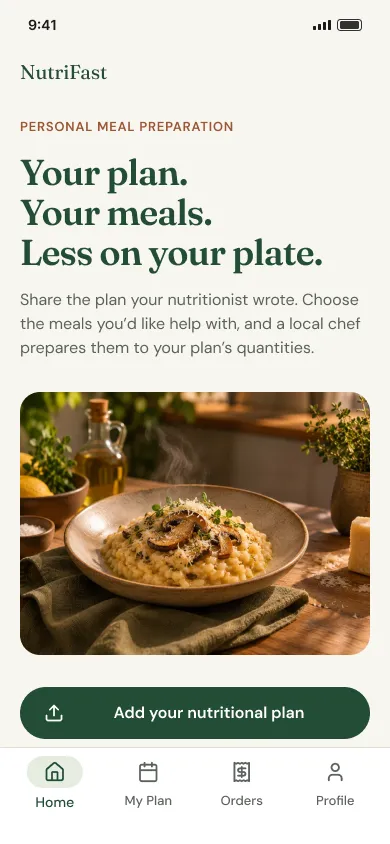
First-time home: “Your plan. Your meals. Less on your plate.” with a food photo and an Add your nutritional plan button.
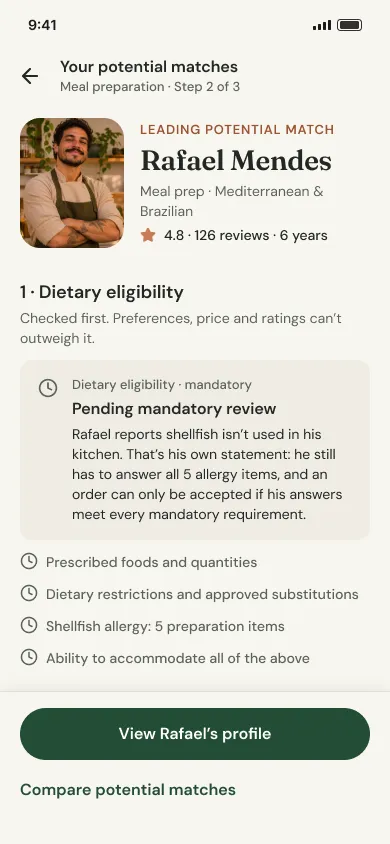
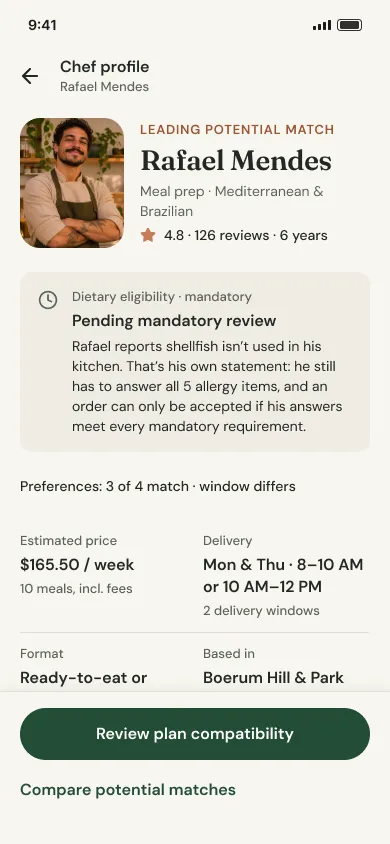
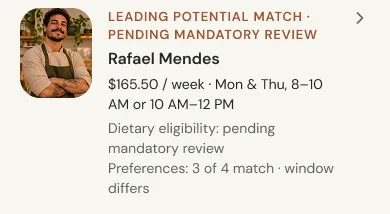
Chef profile for Rafael Mendes, leading potential match, with dietary eligibility pending mandatory review, price and delivery windows.
Role
Product Designer
Project type
Concept project
Platform
Mobile app
Scope
Product Strategy, UX/UI, Design System
Tools
Figma, Claude Code, ChatGPT
Status
High-fidelity design concept

A high-fidelity concept, not launched or implemented. All people, chefs, reviews, prices, transactions and service scenarios in the prototype are fictional examples.

01 — Project Overview

From a plan on paper to meals on the table

NutriFast is a mobile product concept that helps people follow their nutritionist-prescribed meal plans without the daily effort of shopping for ingredients, cooking, and organizing meals.

Originally developed as part of a design challenge at UX Unicórnio, the project explores a service that connects people with personal chefs who prepare meals according to their individual nutritional plans.

I later revisited the concept to deepen the product experience, refine its visual identity, and explore how AI could simplify the journey while keeping users in control of their nutritional information.

02 — The Challenge

Knowing what to eat is not the same as eating that way every day

Following a nutritional plan requires more than motivation. It involves planning meals, shopping for specific ingredients, measuring portions, cooking, and finding time to repeat this process consistently.

While food delivery services make ordering meals convenient, their menus are not necessarily designed around individual nutritional prescriptions. Personalized meal preparation introduces another layer of complexity, as ingredients, portions, and dietary restrictions can vary significantly from person to person.

The challenge was to explore how the convenience of food delivery could be combined with the personalization of a nutritionist-prescribed meal plan.

Start

Nutritional guidance

The everyday effort in between
  1. Planning meals
  2. Shopping for ingredients
  3. Measuring prescribed portions
  4. Cooking and storing food
  5. Finding time to repeat the process
Goal

Putting the plan into practice

A conceptual problem model, not a validated user journey.

How might we

…make following a personalized nutritional plan as convenient as ordering food online, while respecting the nutritional guidance behind it?

03 — Research & Discovery

Where good intentions meet daily routines

I conducted informal interviews with family members who follow nutritionist-prescribed diets, drawing on my own experience as someone who faces similar challenges.

These conversations helped me explore the practical barriers between receiving nutritional guidance and incorporating it into everyday life.

  1. 01

    Time is a barrier to consistency

    Finding time to prepare meals regularly can make following a nutritional plan difficult, particularly when it competes with other daily responsibilities.

    Limited timeReduce preparation effort
  2. 02

    Personalization adds complexity

    Measuring ingredients and following prescribed portions requires additional effort compared to preparing or ordering a regular meal.

    Prescribed portionsPreserve nutritional guidance
  3. 03

    Convenience influences food choices

    Ordering food often becomes the easier alternative, even when the available options do not align with an individual's nutritional plan.

    Convenience gapMake personalized meals accessible
  4. 04

    Consistency requires more than motivation

    Maintaining a nutritional routine involves repeated effort, organization, and access to suitable meals.

    Routine consistencySupport sustainable routines

The opportunities on the right are my design interpretations, not validated research outcomes.

Identifying the opportunity

Rather than creating another tool that tells people what to eat, I wanted to explore a service that helps them put existing nutritional guidance into practice. The opportunity was to reduce the effort between having a nutritional plan and following it in everyday life.

This initial research was exploratory and limited in scope. Further research with a broader audience, nutritionists, and meal preparation professionals would be necessary to validate the concept and its operational feasibility.

04 — Revisiting the Concept

From designing an experience to designing a product

When I first designed NutriFast, my focus was on translating the core idea into a simple and intuitive mobile experience.

Revisiting the project gave me an opportunity to approach the same problem with a more mature product mindset. Beyond refining the visual identity, I wanted to explore how the service could actually work, considering its business rules, operational dependencies, and the different situations users might encounter.

This meant looking beyond the ideal user journey and asking more complex questions: What happens when a nutritional plan contains incomplete information? How should the product handle a chef who cannot accommodate a dietary restriction? How can users manage their meal preparation service as their routines change?

The original concept · UX Unicórnio

Designing the experience

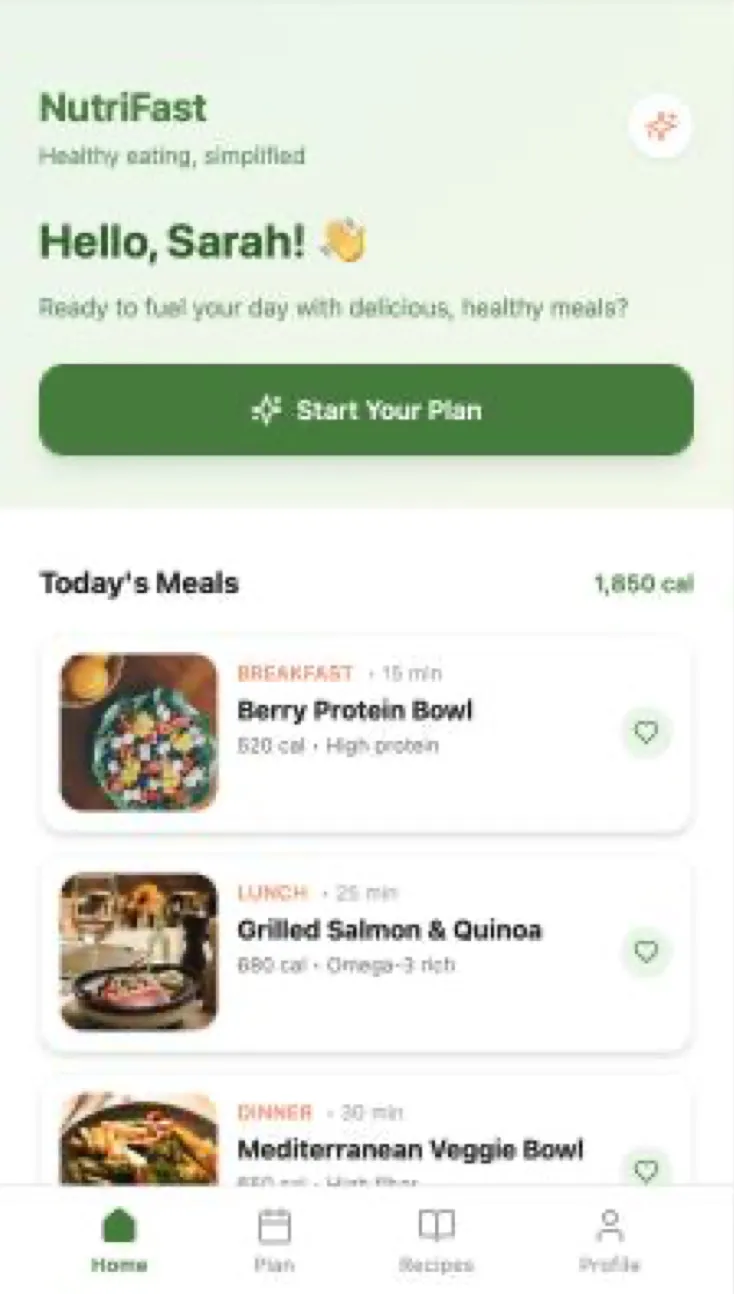
Original concept home: “Hello, Sarah!”, a Start Your Plan button and today's meals.
Home
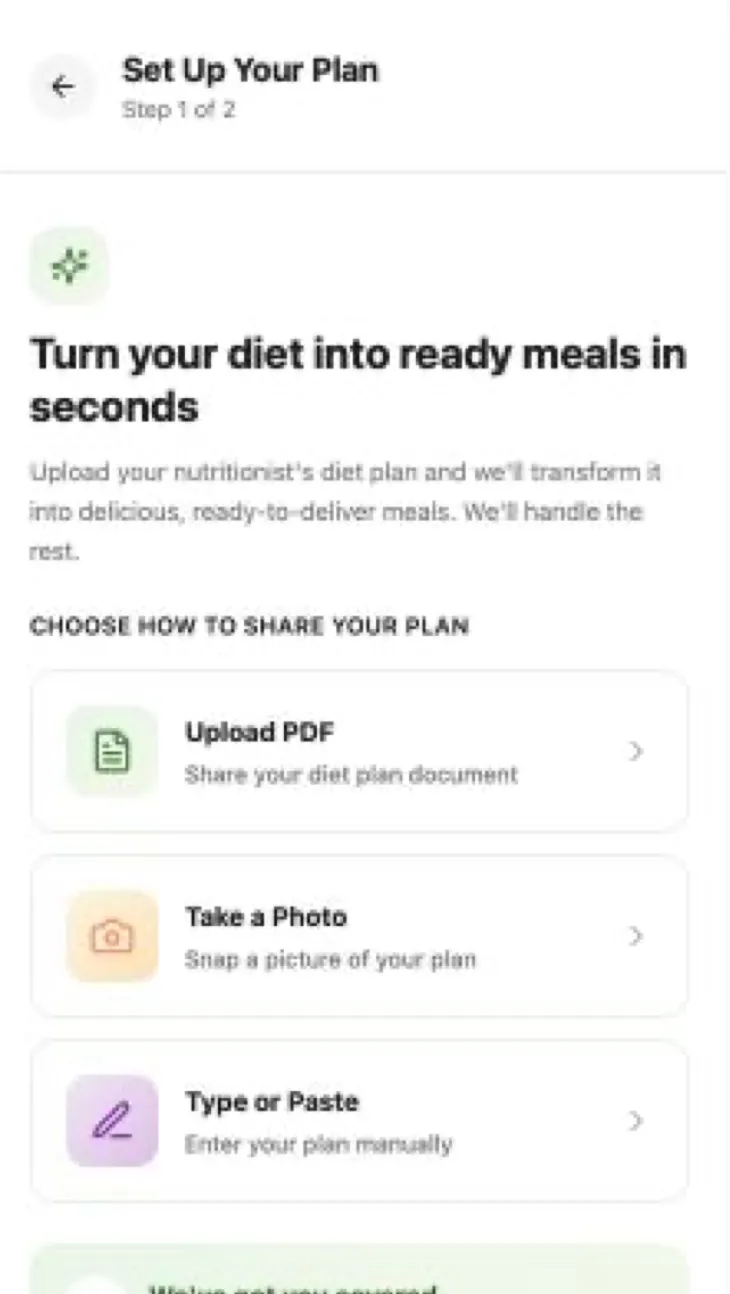
Original concept Set Up Your Plan: upload PDF, take a photo, or type or paste.
Plan upload
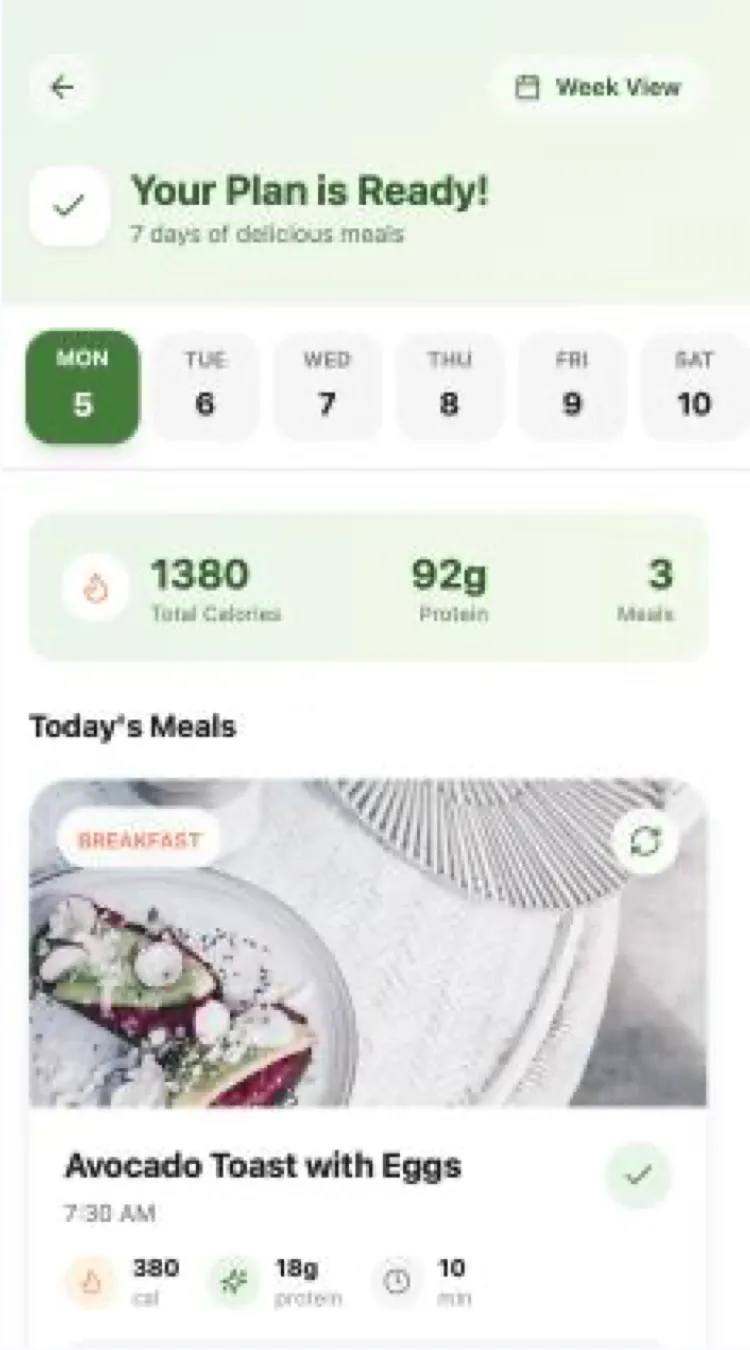
Original concept: “Your Plan is Ready!” with a weekly day picker, calorie summary and today's meals.
Plan created
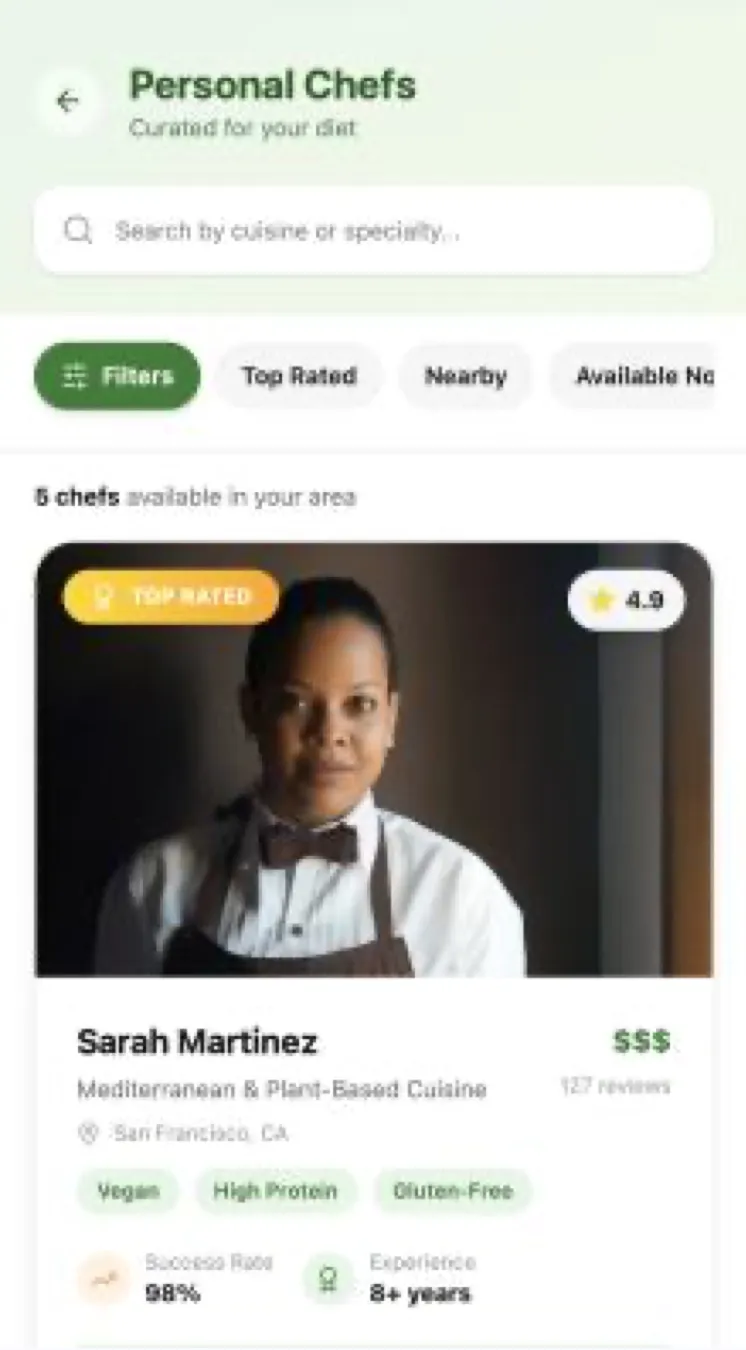
Original concept Personal Chefs: search, filters and a top-rated chef card.
Chef discovery
  • Core user journey
  • Nutritional plan upload
  • Personal chef discovery
  • Initial visual identity

The evolved concept · V4.2

Designing the product

  • End-to-end service lifecycle
  • Responsible AI integration
  • Business rules and dependencies
  • Exception and recovery flows
  • Privacy and user control
  • Refined component system

I also explored two applications of AI: as a proposed product capability to simplify nutritional plan processing, and as a design tool to accelerate exploration, prototyping, and iteration.

Using AI throughout the design process allowed me to explore a broader range of scenarios while critically evaluating the proposed solutions, identifying inconsistencies, and refining the underlying product logic. Many V4.2 interfaces were generated and iterated with AI tools, then evaluated and refined by me.

In the product

AI as a product capability

  • Nutritional document processing
  • Identification of missing or ambiguous information
  • Organization of nutritional plans
  • Human review of extracted information

In my process

AI as a design tool

  • Solution exploration
  • Interface generation
  • Flow iteration
  • Critical evaluation and refinement

The result was a more comprehensive product concept, shaped not only by how the experience looks and feels, but also by how it is intended to function.

05 — Product Strategy

Designing for consistency, not just convenience

Rather than positioning NutriFast as an on-demand marketplace for personal chefs, I chose to explore a subscription-first meal preparation service, with one-time orders available as a flexible alternative.

The recurring model aligns with the core problem identified during discovery: maintaining a nutritional routine over time. It also considers the operational needs of chefs, who must plan ingredient purchases, manage preparation capacity, and accommodate individual dietary requirements.

One-time orders offer a lower-commitment entry point, allowing customers to experience the service before establishing a recurring routine.

  1. 1Nutritionist-provided plan
  2. 2NutriFast plan processing and review
  3. 3Chef matching and service coordination
  4. 4Recurring service Primary model
    4One-time order Flexible alternative
  5. 5Chef sourcing and meal preparation
  6. 6Scheduled delivery
Proposed service model. Its operational assumptions have not been validated.
  1. 01

    Preserve, rather than prescribe

    NutriFast is not designed to replace nutritionists or generate diets. Its purpose is to translate existing nutritional guidance into a practical meal preparation experience.

  2. 02

    Prioritize recurring routines

    A subscription-first model supports ongoing meal preparation while creating opportunities for more predictable demand, ingredient sourcing, and delivery planning.

  3. 03

    Separate the nutritional plan from the service

    Users can access and manage their nutritional plans independently of an active meal preparation subscription. Cancelling the service does not mean losing access to their plan.

  4. 04

    Prioritize requirements over preferences

    Mandatory dietary requirements take precedence over convenience, price, and delivery preferences when evaluating potential chefs.

  5. 05

    Automate with human oversight

    AI-assisted document processing reduces the effort of entering nutritional information, while human review helps prevent incomplete or incorrectly extracted information from becoming part of the confirmed plan.

Together, these decisions establish a product direction that balances customer convenience, operational feasibility, and responsible automation.

The proposed service model and its operational assumptions would require further validation with customers, chefs, nutritionists, and food safety specialists.

06 — Design Principles

Four principles

They shaped how the product handles nutritional information, automation, and everyday decisions.

  1. 01

    Fidelity

    Respect the original nutritional guidance without automatically changing prescribed foods, portions, or dietary restrictions.

  2. 02

    Transparency

    Make AI-generated information, uncertainties, recommendations, and service conditions understandable to users.

  3. 03

    Autonomy

    Give users control over their nutritional information, meal preparation preferences, and recurring commitments.

  4. 04

    Safety by design

    Treat mandatory dietary requirements as product constraints, preventing convenience or user preferences from overriding unresolved requirements.

07 — Designing the Experience

Six decisions, one routine

7.1

From document to digital plan

Reducing the effort of getting started.

Nutritional plans often exist as documents provided by nutritionists. Requiring users to manually recreate every meal, ingredient, and prescribed portion would introduce unnecessary friction before they could access the service.

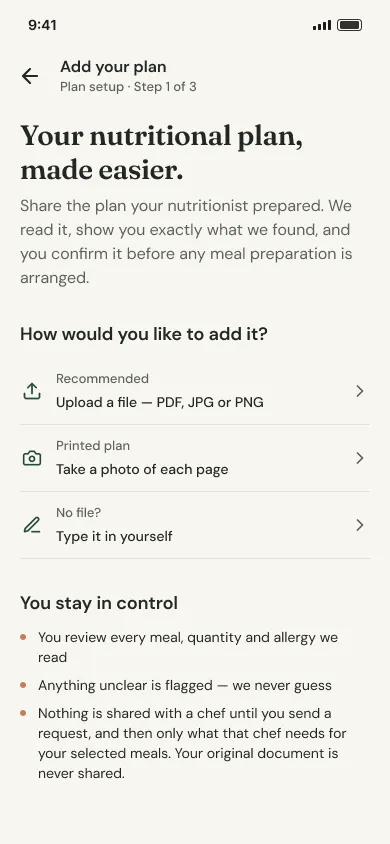
I designed an onboarding experience that allows users to upload a document, photograph their nutritional plan, or enter the information manually. The proposed AI-assisted processing organizes the information into a structured digital plan, preserving meals, prescribed quantities, dietary restrictions, and approved substitutions.

Rather than treating the extracted information as immediately reliable, the experience introduces a review stage before the plan is confirmed. Once confirmed, the nutritional plan becomes an independent resource that users can access without subscribing to the meal preparation service.

  1. 1Choose how to add it

    Add your plan: upload a file, take a photo of each page, or type it in yourself, with a list of how the user stays in control.
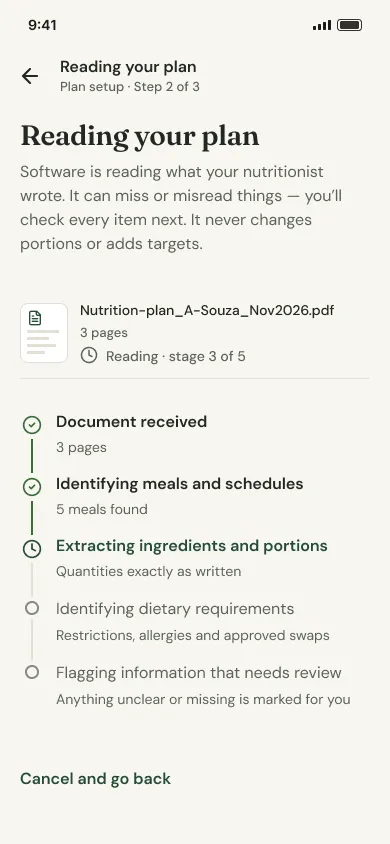
  2. 2The plan is read

    Reading your plan: the document is read in five stages, from document received to flagging information that needs review.
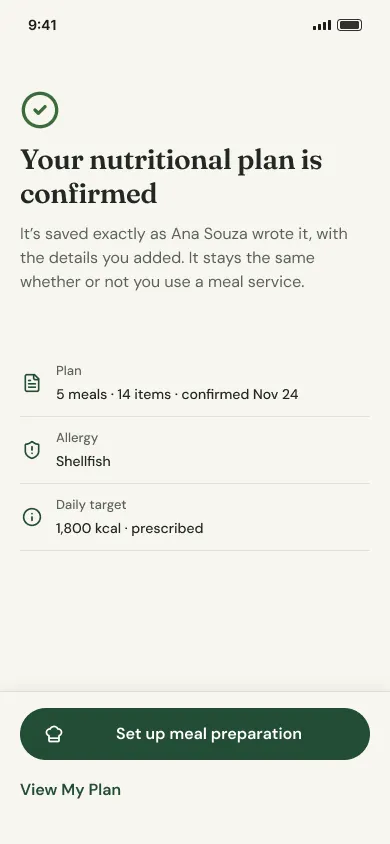
  3. 3Reviewed, then confirmed
    Your nutritional plan is confirmed: saved exactly as Ana Souza wrote it, with plan, allergy and daily target summarized.
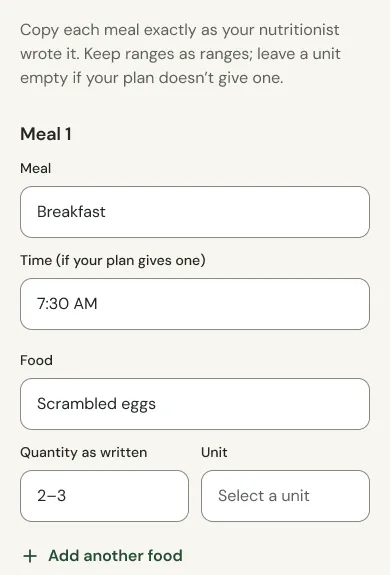
Type your plan: fields for meal, time, food, quantity as written and unit, with the instruction to keep ranges as ranges.
No file? Manual entry asks for quantities exactly as written and leaves the unit empty when the plan doesn't give one.

7.2

Making AI accountable

Designing for uncertainty, not assuming accuracy.

Instead of assuming that document extraction is always accurate, I designed a review experience that makes uncertainty visible and actionable.

Users can review extracted information alongside its original source, resolve ambiguous quantities, identify missing details, and confirm dietary restrictions before proceeding. When information is missing, the system does not invent nutritional values or automatically adjust prescribed portions. Users can save their progress and seek clarification from their nutritionist.

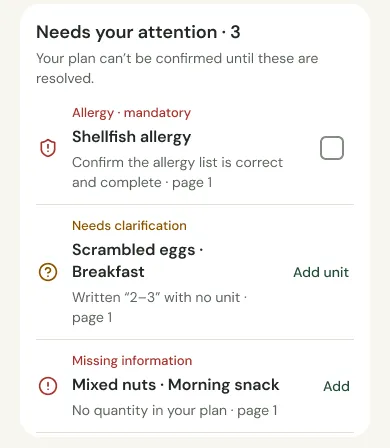
Before review · 3 items open

Check what we found: Needs your attention, 3 items. Shellfish allergy to confirm, scrambled eggs written 2 to 3 with no unit, and mixed nuts with no quantity in the plan.
  1. Mandatory allergy. Must be confirmed as correct and complete.
  2. Ambiguous unit. “2–3” is kept as a range; the unit is asked for, not guessed.
  3. Missing quantity. Flagged instead of filled in.

After review · ready to confirm

Everything is ready to confirm: shellfish allergy confirmed, scrambled eggs 2 to 3 whole eggs with the unit confirmed by the user, and mixed nuts 20 g entered by the user after clarification from the nutritionist.
  1. Confirmed by the user.

  2. From the document, with the unit confirmed by the user.

  3. Entered by the user after clarification from the nutritionist, and labelled that way.

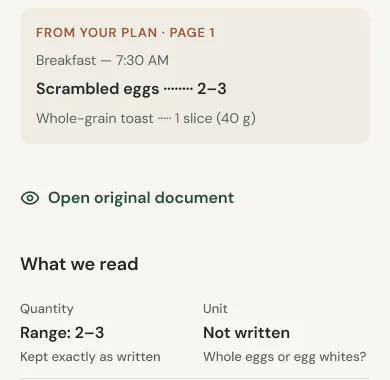
Traceability

Clarify an item: the exact line from page 1 of the plan, an Open original document link, and what was read: range 2 to 3, unit not written.
Each question shows the line it came from, with the original document one tap away.

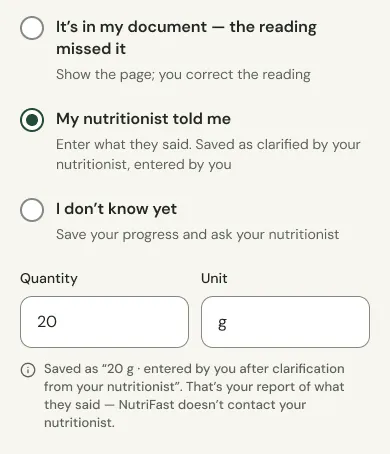
Uncertainty

Missing details: the user chooses where a quantity comes from, the document, their nutritionist, or not known yet, and the saved note records it as entered by the user after clarification.
The user states where a missing value comes from. NutriFast records it, and doesn't contact the nutritionist.

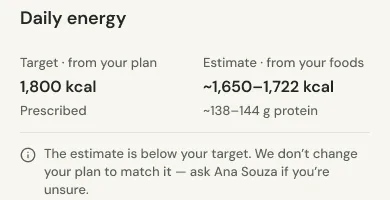
Human oversight

Daily energy: target 1,800 kcal prescribed from the plan, estimate about 1,650 to 1,722 kcal from the foods, with a note that the plan isn't changed to match.
Prescribed targets and estimates stay separate. A discrepancy is shown, never corrected.

The role of AI is to assist with interpreting and organizing information, while keepingnutritional decisions outside the system's authority.

Extraction accuracy has not been measured or clinically validated.

7.3

Personalizing the service

Adapting the service to the user's routine, not the other way around.

Following a nutritional plan does not necessarily mean outsourcing every meal. I designed a flexible service setup that allows users to select which meals they want prepared, choose delivery days, define preferred delivery windows, and decide between ready-to-eat and semi-prepared meals.

The experience separates flexible service preferences from mandatory nutritional requirements. Users can personalize how the service fits into their lives without unintentionally modifying their prescribed diet. It also gives chefs a clearer understanding of customer expectations before committing to a request.

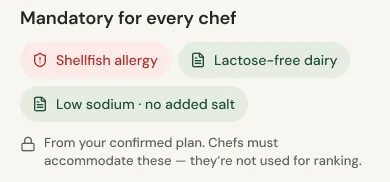
Mandatory · fixed by the plan

Mandatory for every chef: shellfish allergy, lactose-free dairy, and low sodium with no added salt, from the confirmed plan and not used for ranking.
  • Prescribed foods
  • Prescribed portions
  • Dietary restrictions
  • Food allergies
  • Approved substitutions

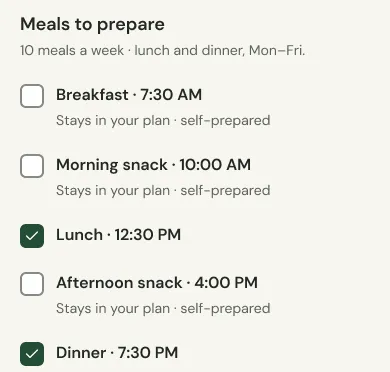
Flexible · chosen by the user

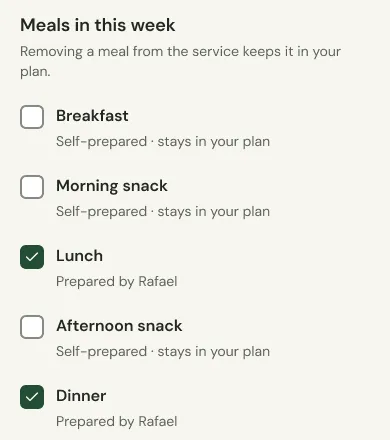
Meals to prepare: lunch and dinner selected; breakfast, morning snack and afternoon snack stay in the plan as self-prepared.
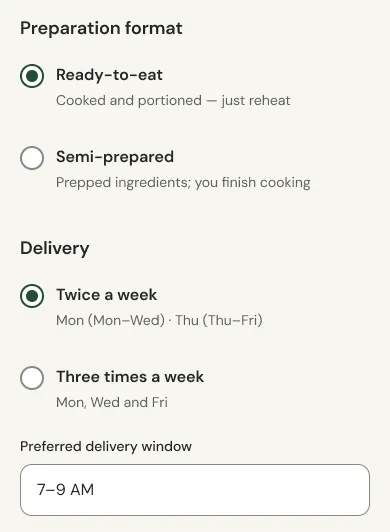
Meal selection
Preparation format ready-to-eat or semi-prepared, delivery twice or three times a week, and a preferred delivery window of 7 to 9 AM.
Format, frequency and window
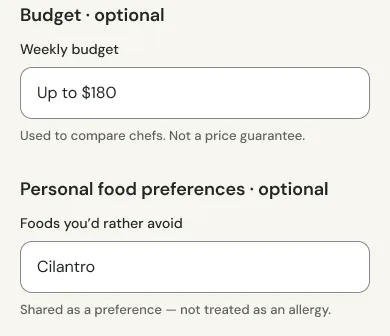
Optional weekly budget up to $180, used to compare chefs and not a price guarantee, and a food to avoid shared as a preference, not an allergy.
Weekly budget

7.4

Finding the right chef

Making recommendations meaningful and explainable.

Your potential matches: Rafael Mendes as leading potential match, with dietary eligibility checked first and pending mandatory review.

Choosing a personal chef involves more than comparing prices, ratings, or availability. The provider must also be able to accommodate the customer's nutritional requirements.

Rather than relying on an opaque compatibility score, the experience explains why a chef is suggested, which preferences they match, what trade-offs are involved, and which requirements still need to be assessed. Known dietary concerns are surfaced throughout, and unresolved mandatory requirements prevent an order from being accepted.

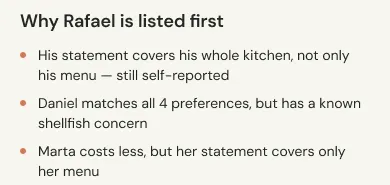
Why Rafael is listed first: his statement covers his whole kitchen, Daniel matches all preferences but has a known shellfish concern, and Marta costs less but her statement covers only her menu.
The ranking is explained in plain language.
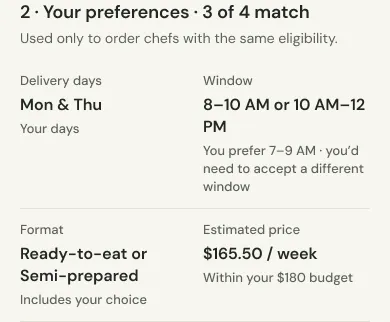
Your preferences, 3 of 4 match: delivery days, delivery window that differs from the user's preference, format and estimated price within budget.
Preference matches and trade-offs are shown, separate from eligibility.

Proposed decision logic

Preference matching can appear before the mandatory assessment is complete, but it never implies dietary eligibility.

  1. 1Identify potential providers.
  2. 2Surface known dietary concerns and outstanding mandatory requirements.
  3. 3Explain preference matches and trade-offs.
  4. 4Assess mandatory requirements through the request process.
  5. 5Block order acceptance if mandatory requirements remain unresolved or unmet.
  6. 6Allow an informed customer decision only after the proposed eligibility conditions are met.

Compare potential matches

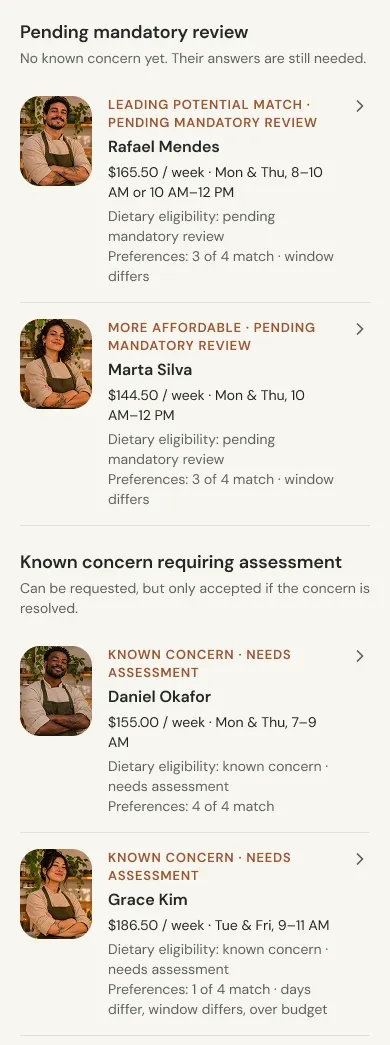
Compare chefs grouped by dietary eligibility: pending mandatory review for Rafael and Marta, then known concern requiring assessment for Daniel and Grace.
Chefs are grouped by dietary eligibility first. Preferences never move a chef above one with fewer concerns.

Separate scenario · known concern

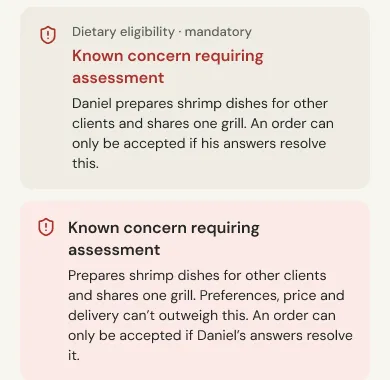
Alternative scenario, Daniel Okafor: known concern requiring assessment, because he prepares shrimp dishes for other clients and shares one grill.
A chef with a known concern can be requested, but an order can only be accepted if the answers resolve it. Provider statements are self-reported, not verified, and real eligibility criteria would need specialist validation.

7.5

Building confidence before commitment

Turning checkout into an informed commitment.

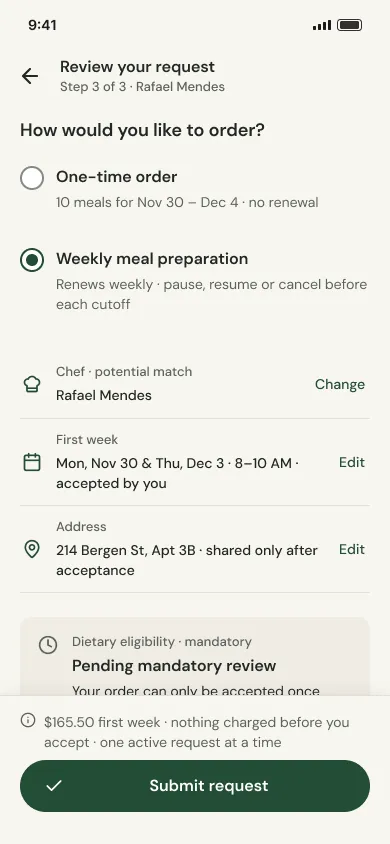
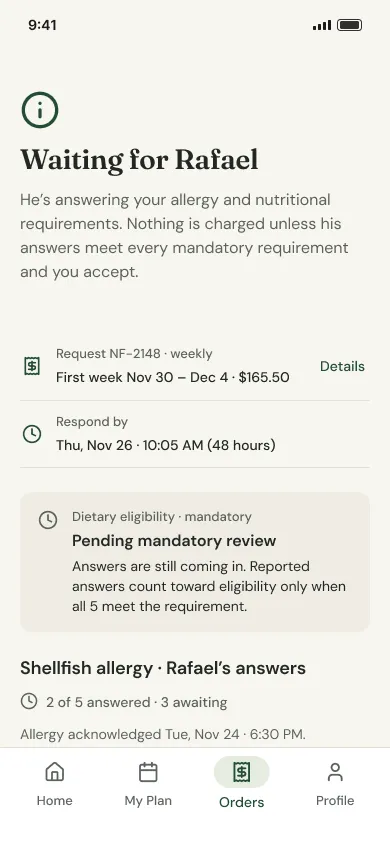
An immediate purchase would not account for the provider's ability to source ingredients, accommodate dietary requirements, or fulfill the requested schedule. I designed a request-based ordering experience: customers review their meals, schedule, pricing and conditions, then submit a request. The chef assesses it and answers the mandatory requirements.

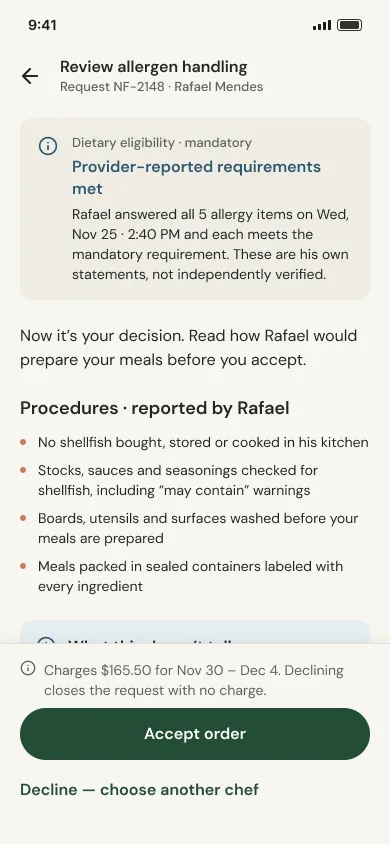
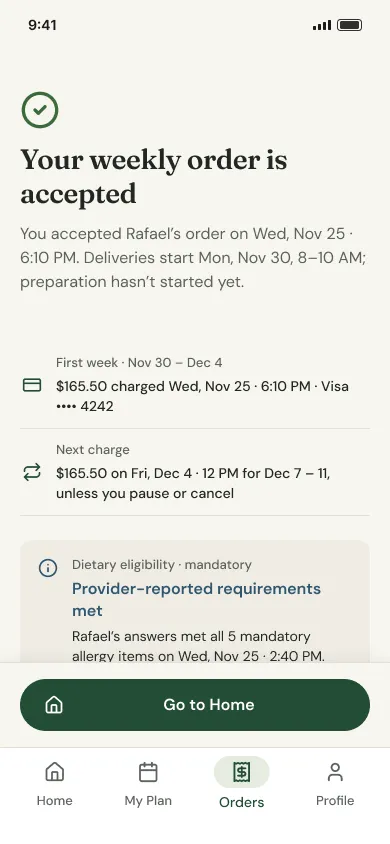
Once the proposed eligibility conditions are met, customers review the provider's responses and make an informed decision before payment is processed. Response deadlines, recurring payment conditions and preparation cutoffs show when a commitment becomes final.

  1. 1Review request

    Review your request, Rafael Mendes, weekly meal preparation: first week Mon Nov 30 and Thu Dec 3, 8 to 10 AM, address shared only after acceptance, pending mandatory review.
  2. 2Submit without payment

    Waiting for Rafael: nothing is charged unless his answers meet every mandatory requirement and you accept; respond by Thursday, Nov 26.
  3. 3Customer review

    Review allergen handling: provider-reported requirements met, not independently verified, and Rafael's procedures to read before accepting.
  4. 4Confirm and pay

    Your weekly order is accepted: $165.50 charged for the first week, and the next charge on Friday, Dec 4 unless paused or cancelled.

Payment timing

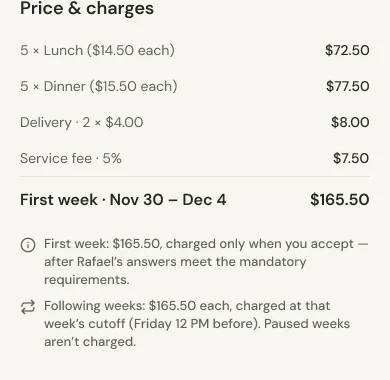
Price and charges for the first week, $165.50, charged only when the user accepts after Rafael's answers meet the mandatory requirements; following weeks charged at each week's cutoff.

Provider assessment

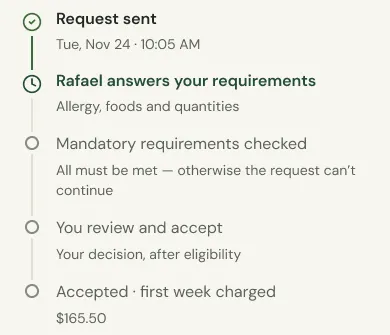
Request timeline: request sent, Rafael answers the requirements, mandatory requirements checked, you review and accept, accepted and first week charged.

This aims to reduce uncertainty for both customers and chefs while establishing clearer expectations throughout the service.

7.6

Supporting everyday routines

Designing beyond the transaction.

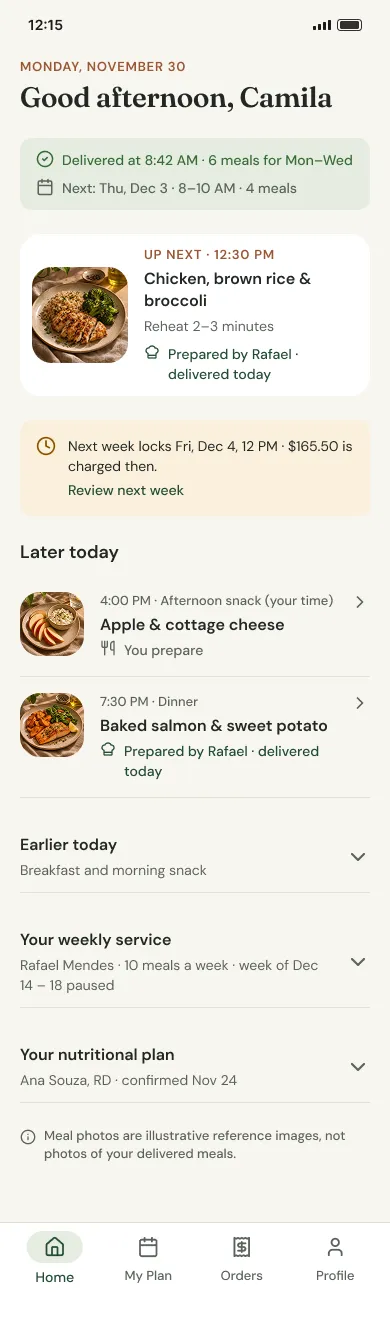
Active home, full length: delivered today, up next lunch prepared by Rafael, next week's cutoff, later today's meals, and the weekly service and nutritional plan.

The core value of NutriFast is not simply ordering personalized meals, but supporting an ongoing nutritional routine.

The home experience brings together chef-prepared and self-prepared meals, so users can follow their complete plan regardless of which meals they outsource. They can adjust upcoming weeks, pause deliveries, or cancel their recurring service while keeping access to their plan.

Clear preparation cutoffs distinguish flexible future commitments from orders already being fulfilled, balancing customer autonomy with the chef's operational needs.

Chef-prepared and self-prepared

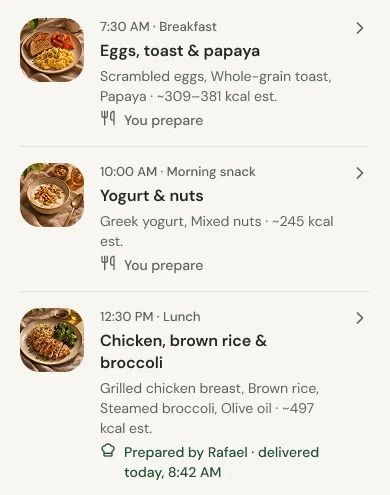
My Plan meals: breakfast and morning snack marked You prepare, lunch marked Prepared by Rafael, delivered today.

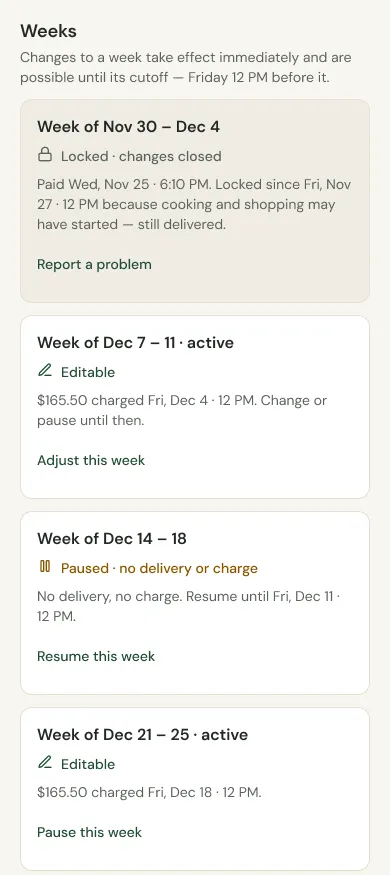
Weeks: locked, editable, paused

Manage meal service weeks: Nov 30 to Dec 4 locked and paid, Dec 7 to 11 editable, Dec 14 to 18 paused with no delivery or charge, Dec 21 to 25 editable.

Adjust a week

Week of Dec 7 to 11, editable until Friday: lunch and dinner prepared by Rafael; other meals stay in the plan as self-prepared.

Beyond checkout, NutriFast becomes a tool for managing everyday routines rather than simply a platform for purchasing meals.

08 — Designing for the Unexpected

More than the ideal journey

As the concept evolved, I explored situations where users might encounter incomplete information, incompatible service providers, changing schedules, or unexpected interruptions. Rather than treating them as isolated error states, I approached them as part of the product experience: how users recover, understand their options, and stay in control.

  • Unreadable document: “We couldn’t read this photo clearly”, the file flagged as hard to read, and three ways to continue: upload a clearer file, retake the photo, or type it in.

    Document processing failures

    When a document cannot be read, users can replace the file, take a clearer photograph, or enter their nutritional plan manually.

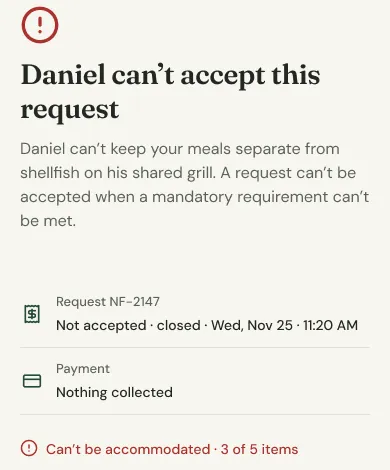
  • Alternative scenario: “Daniel can’t accept this request”, request closed, nothing collected, 3 of 5 items can’t be accommodated.

    Incompatible dietary requirements

    When a chef cannot accommodate a mandatory dietary requirement, the request cannot proceed to payment. Users can explore alternative providers without recreating their plan or preferences.

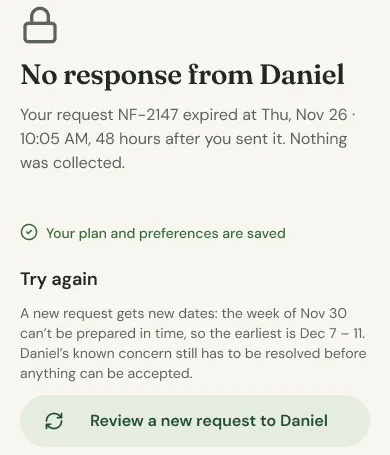
  • Alternative scenario: “No response from Daniel”, request expired after 48 hours, nothing collected, plan and preferences saved, and a retry option with new dates.

    Expired requests

    If a chef does not respond in time, users can retry or explore other providers, with delivery dates recalculated according to preparation cutoffs.

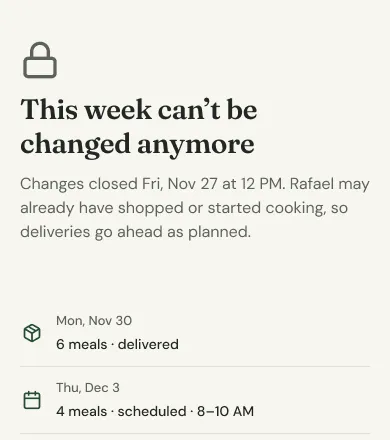
  • Locked week: “This week can’t be changed anymore”, with the delivered and scheduled deliveries listed.

    Changing commitments

    Users can pause or adjust future deliveries while understanding which orders are already committed to preparation.

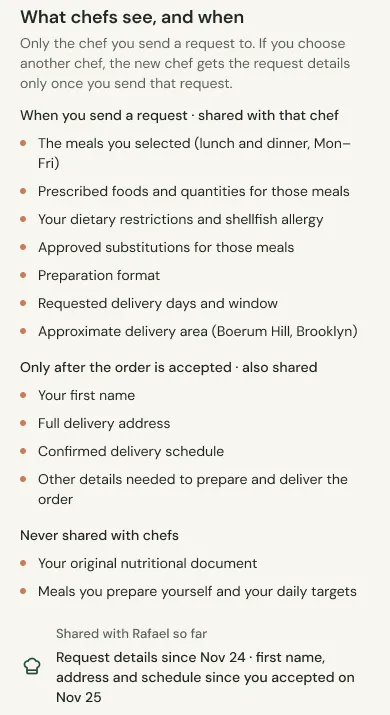
  • What chefs see, and when: details shared when a request is sent, details shared only after acceptance, and items never shared with chefs.

    Data ownership and privacy

    Users can see what is shared with chefs at request and after acceptance, manage their original documents, and control their stored plan independently of the service.

The Daniel screens are an alternative scenario, separate from the Rafael journey above. Privacy handling, food safety procedures and technical safeguards are design proposals and have not been independently verified.

09 — Visual Identity & Design System

Making nutrition feel approachable

NutriFast headline in the product's serif: “Your plan. Your meals. Less on your plate.” under the eyebrow Personal meal preparation.

I wanted NutriFast to feel less like a clinical nutrition tool and more like a thoughtful service that belongs in people's everyday lives.

The visual direction combines a natural color palette, editorial typography, food photography, and clean interface components. It balances expressive visual elements with functional clarity, particularly in information-heavy screens involving nutritional details, dietary requirements, and service management.

  • Forest#2E5E46Primary actions, headlines
  • Sage#EAF0E6Confirmed states, chips

  • Ivory#F9F8F3Background
  • Clay#AC6943Eyebrow labels
  • Brick#B9463BAllergies, destructive actions
  • Cream#FCF3E3Upcoming cutoffs
  • Ink#2D3530Body text

Values sampled from the exported V4.2 screens.

Food photography: a mushroom risotto on a rustic table with olive oil and herbs.
Food photography
Chef card: Rafael Mendes, leading potential match, pending mandatory review, with price, days, window and preference match.
Chef card with explicit status labels
Requirement chips: shellfish in red with a shield icon, lactose-free dairy and low sodium in sage with a document icon.
Semantic chips: icon and label, not color alone
Primary button: Add your nutritional plan, with a short reassurance line below.
Primary action
Tab bar: Home selected, My Plan, Orders and Profile.
Navigation

A reusable component system supports consistency across the experience, including form controls, meal cards, navigation, selection patterns, and feedback states. Semantic colors and explicit status labels distinguish confirmed information, pending actions, warnings, and blocked scenarios without relying on color alone.

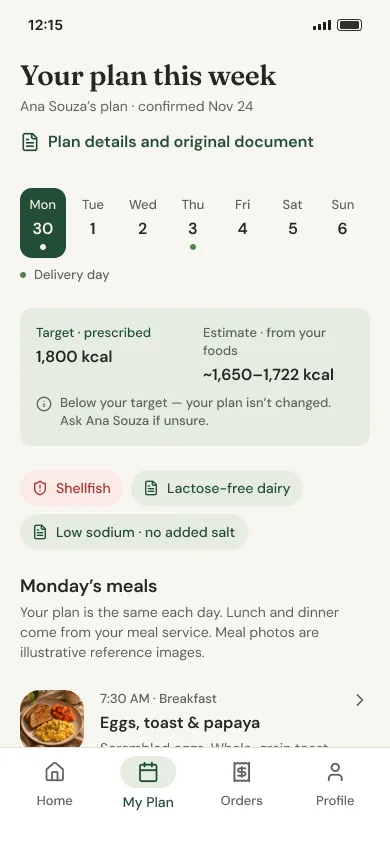
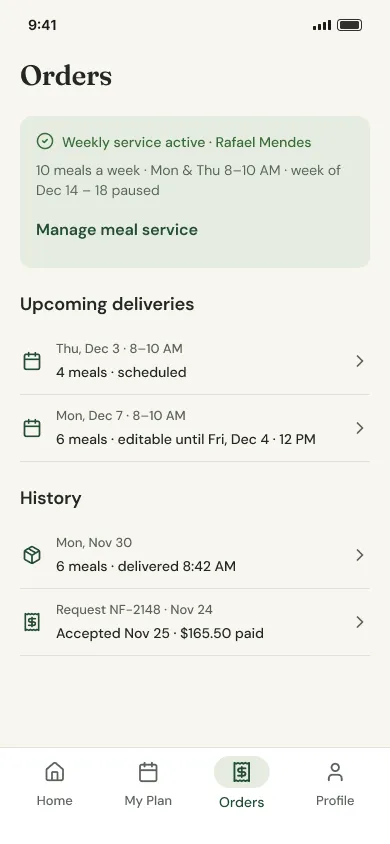
The visual system was refined alongside the product's functionality, allowing the experience to remain cohesive as new requirements and scenarios were introduced.
My Plan this week: day picker, prescribed target and estimate, requirement chips and Monday's meals.
Orders: weekly service active with Rafael Mendes, upcoming deliveries and history.
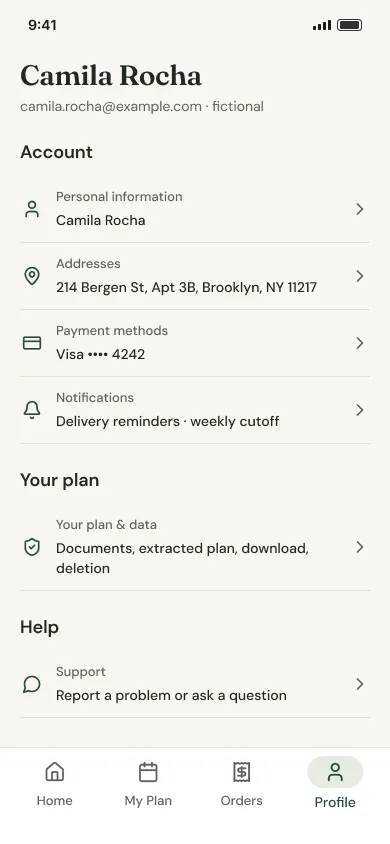
Profile: account details, your plan and data, and support.

10 — Reflection & Next Steps

What designing a product really involves

Revisiting NutriFast helped me recognize how much my approach to product design has evolved.

What began as an exploration of a convenient meal preparation experience became an opportunity to think more deeply about business rules, operational constraints, responsible automation, and the relationship between different participants in a service.

Working with AI as a design tool also changed how I approached iteration. It allowed me to explore more possibilities, but it reinforced the importance of questioning proposed solutions, identifying inconsistencies, and making intentional design decisions.

What's next

As NutriFast remains a product concept, the next steps would focus on validating its assumptions and feasibility:

  • Conduct broader research with people who follow nutritional plans.
  • Interview nutritionists and personal chefs to understand professional and operational requirements.
  • Evaluate ingredient sourcing, preparation capacity, delivery logistics, and subscription economics.
  • Collaborate with food safety specialists to establish appropriate dietary eligibility criteria.
  • Evaluate AI document extraction accuracy and its limitations.
  • Conduct usability testing across the core journey and critical exception scenarios.

These steps would help determine whether the proposed experience could become a viable, trustworthy, and useful service in practice.

Designing a product means understanding the conditions that allow the experience to work, the situations in which it might fail, and how the product should respond.